The 5 Types of Processors Explained: Choosing the Right CPU
So you're looking at building a PC, buying a laptop, or just trying to figure out why your phone feels faster than your old computer. The heart of the matter is the processor. But when you start digging, you get hit with a wall of jargon: CPU, GPU, APU, SoC, TPU. What's the difference? Aren't they all just "processors"?
Yes and no. While they all crunch numbers, they're built for wildly different jobs. Picking the wrong type is like using a sports car to haul lumber—possible, but painfully inefficient.
Let's cut through the noise. There are five fundamental types of processors you need to know about. Understanding them isn't just tech trivia; it's the key to spending your money wisely and getting a device that doesn't drive you crazy with slowdowns. I've been building and fixing systems for over a decade, and the number one mistake I see is people focusing only on clock speed and core count, completely ignoring what type of processor they actually need for their daily tasks.
What You'll Learn in This Guide
- 1. The Central Processing Unit (CPU): The General Manager
- 2. The Graphics Processing Unit (GPU): The Specialist Artist
- 3. The Accelerated Processing Unit (APU): The All-in-One Solution
- 4. The System on a Chip (SoC): The Complete Package
- 5. Specialized AI & Tensor Processors: The New Frontier
- How to Choose the Right Processor for Your Needs?
- Your Processor Questions, Answered
1. The Central Processing Unit (CPU): The General Manager
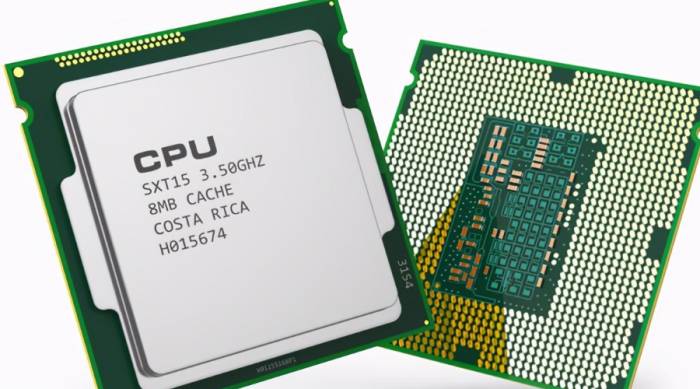
This is the classic processor, the brain of most computers you've ever used. Think of it as a brilliant, versatile general manager. It's fantastic at handling a wide variety of tasks sequentially and making complex decisions quickly. When you open a spreadsheet, run a coding compiler, or have twenty browser tabs open, the CPU is the one orchestrating the chaos.
Modern CPUs from Intel (Core i3/i5/i7/i9) and AMD (Ryzen 3/5/7/9) are multi-core marvels. But here's the nuance everyone misses: more cores aren't always better. A high-core-count CPU like a Ryzen 9 is wasted on someone who just emails and streams Netflix. That user would be better served by a cheaper, fewer-core CPU with a faster single-core speed, which makes everyday snappiness better. Conversely, a video editor rendering a 4K file will thank you for those extra cores.
Where you'll find it: Desktop computers, most laptops, servers, and workstations. Best for: General computing, office work, programming, web servers, and applications that benefit from strong single-threaded performance or complex branching logic.
2. The Graphics Processing Unit (GPU): The Specialist Artist
If the CPU is the general manager, the GPU is a factory with thousands of identical, simpler workers. It's built for parallel processing—doing the same simple operation on massive piles of data at once. This makes it perfect for rendering the millions of pixels in a game frame or applying a filter to every pixel in a photo.
The big names are NVIDIA (GeForce for gaming, RTX for prosumer, data center GPUs) and AMD (Radeon). But GPUs aren't just for games anymore. This parallel muscle is why they're the engine of modern AI, cryptocurrency mining (for better or worse), and scientific simulations. This shift is so important it has its own name: GPGPU (General-Purpose computing on Graphics Processing Units).
A common mistake is thinking you need the most expensive GPU. For 1080p gaming, a mid-range card is often perfect. Splurging on a flagship model only makes sense for 4K gaming, professional 3D rendering, or heavy machine learning work.
Where you'll find it: Dedicated graphics cards in PCs, integrated into some high-end laptops, and in massive arrays in data centers for AI. Best for: Gaming, video editing and effects (like in Adobe Premiere), 3D modeling and animation (Blender, Maya), AI/ML model training, and complex computational tasks.
3. The Accelerated Processing Unit (APU): The All-in-One Solution
AMD coined this term, and it's essentially a marketing name for a specific type of processor: a CPU and a reasonably powerful GPU fused onto the same piece of silicon. It's not just "integrated graphics"—it's a deliberate design where the CPU and GPU share resources like memory more efficiently.
The benefit is cost and space savings. You don't need to buy a separate graphics card. The downside? The GPU part, while competent, is never as powerful as a high-end dedicated GPU. It's a fantastic choice for budget gaming PCs, small form-factor builds, or office machines where you might want to play the occasional older game or do light photo editing.
Models like AMD's Ryzen 5 5600G or the newer Ryzen 7000G series are prime examples. They offer surprising gaming capability at 1080p with low-to-medium settings.
Where you'll find it: Budget-friendly desktop PCs, mini-PCs, and some all-in-one computers. Best for: Value-oriented builds, home theater PCs, light gaming, and general use systems where a discrete GPU is overkill or too expensive.
4. The System on a Chip (SoC): The Complete Package
This is where things get integrated. An SoC isn't just a processor; it's an entire computer system etched onto a single chip. It includes the CPU cores, GPU cores, memory controllers, Wi-Fi/Bluetooth radios, GPS, and sometimes even the RAM and storage. It's the ultimate in miniaturization and power efficiency.
You interact with SoCs every day. Your smartphone (whether it uses an Apple A-series chip, a Qualcomm Snapdragon, or a MediaTek Dimensity) is powered by an SoC. So are your tablet, smartwatch, and most smart home devices. The Apple M-series chips (M1, M2, M3) that power modern Macs are incredibly powerful, high-end SoCs. They ditch the old Intel CPU + separate RAM model for a unified architecture where everything is on one package, which is a huge reason for their speed and battery life.
Where you'll find it: Smartphones, tablets, modern Apple Silicon Macs, Raspberry Pi and other single-board computers, IoT devices. Best for: Mobile devices where space and battery life are critical, and increasingly in laptops and desktops for their efficiency and performance-per-watt.
5. Specialized AI & Tensor Processors: The New Frontier
This is the newest category, born from the AI boom. These are processors designed from the ground up for one specific type of math: the matrix and tensor operations that are the foundation of neural networks and machine learning. While GPUs are good at this, these specialized chips are great at it, offering orders of magnitude better performance and efficiency.
Examples include Google's Tensor Processing Unit (TPU) which runs in their data centers and is now part of their Pixel phone's Tensor SoC. NVIDIA's Tensor Cores are specialized units inside their modern GPUs dedicated to AI math. Apple's Neural Engine is a dedicated block inside their M-series and A-series SoCs for on-device AI tasks like photo processing and voice recognition.
For the average user, you don't "buy" one of these separately. You get them as part of another device. Their presence is what enables features like real-time language translation, advanced photo filters, and responsive voice assistants without needing an internet connection.
Where you'll find it: Integrated into modern smartphones (Google Tensor, Apple Neural Engine), inside high-end GPUs (NVIDIA Tensor Cores), and in cloud data centers (Google TPU, Amazon Inferentia). Best for: Accelerating machine learning inference and training, on-device AI features, and any task involving heavy linear algebra.
How to Choose the Right Processor for Your Needs?
So, which one do you need? It's never just one. A modern device is a team of these processors working together. Your laptop likely has a CPU (or an SoC that includes CPU cores), integrated GPU cores, and maybe a dedicated AI accelerator. The key is knowing which component needs to be strongest for your workload.
This table should help you match your primary activity to the most critical processor type:
| Your Primary Use Case | Most Critical Processor Type | What to Look For | Example Scenario |
|---|---|---|---|
| Office Work, Web Browsing, Programming | CPU (with competent integrated graphics) | A modern mid-range CPU (e.g., AMD Ryzen 5, Intel Core i5) with 6+ cores. Fast single-core performance is key for snappiness. | You run Slack, 20 Chrome tabs, VS Code, and a local development server simultaneously. |
| Gaming at 1080p/1440p | GPU (paired with a good CPU) | A dedicated graphics card is a must. Match a mid-range GPU (e.g., NVIDIA RTX 4060, AMD RX 7600) with a CPU that won't bottleneck it. | You want to play the latest AAA games at high settings and smooth frame rates. |
| Video Editing, 3D Animation | GPU & CPU (Both are crucial) | A high-core-count CPU (Ryzen 9/Intel i7/i9) for encoding/decoding and a powerful GPU (RTX 4070 Ti or better) for rendering and effects acceleration. | You edit 4K footage in Premiere Pro and use GPU-accelerated effects. |
| Building a Compact, Budget PC | APU | An AMD Ryzen G-series processor. It gives you decent CPU and GPU performance in one affordable, low-power package. | You want a small living room PC for streaming and light indie gaming without a bulky graphics card. |
| Buying a Laptop for Battery Life & Portability | SoC | A laptop with an Apple M-series chip or a modern Intel/AMD laptop with a high-efficiency SoC design. Look for "unified memory" architecture. | You need a laptop that lasts all day on a charge for note-taking, research, and media consumption. |
| On-Device AI & Photography | Specialized AI/Tensor Processor (within an SoC) | A smartphone or laptop that advertises a dedicated AI/NPU/Neural Engine (e.g., Google Pixel, iPhone, MacBook with Apple Silicon). | You want the best computational photography on a phone or fast, private voice assistant responses without cloud latency. |
My personal rule of thumb? Allocate your budget to the processor type that sweats the most for your main task. If you game, spend more on the GPU. If you compile code, prioritize the CPU. If you want all-day battery life, an efficient SoC is non-negotiable.

Comments
Share your experience